






前端开发
647
初始化项目
准备工作: 首先要安装node,node官网:https://nodejs.org/en/ 全局安装npm
npm install --global gulp
npm安装typescript
npm install -g typescript
开始初始化项目 通过执行命令 npm init -y 初始化一个项目并创建package.json文件 使用 tsc --init 创建ts的配置文件tsconfig.json
使用构建工具webpack
安装依赖包
npm i -D webpack webpack-cli webpack-dev-server
- webpack 构建工具webpack
- webpack-cli webpack的命令行工具
- webpack-dev-server
webpack的开发服务器
npm i -D ts-loader typescript - typescript ts编译器
- ts-loader
ts加载器,用于在webpack中编译ts文件
npm i -D html-webpack-plugin clean-webpack-plugin - html-webpack-plugin webpack中html插件,用来自动创建html文件
- clean-webpack-plugin webpack中的清除插件,每次构建都会先清除目录
配置webpack 在根目录下配置webpack.config.js
const path = require("path"); const HtmlWebpackPlugin = require("html-webpack-plugin"); const { CleanWebpackPlugin } = require("clean-webpack-plugin"); module.exports = { // 指定入口文件 entry: "./src/index.ts", // 开发模式使用,方便查错误 devtool: "inline-source-map", // 配置服务器 devServer: { contentBase: "./dist", }, // 指定打包文件所在目录 output: { path: path.resolve(__dirname, "dist"), filename: "bundle.js", environment: { arrowFunction: false, // 关闭webpack的箭头函数,可选 }, }, // 用来设置引用模块 resolve: { extensions: [".ts", ".js"], }, // 配置webpack的loader module: { rules: [ { test: /.ts$/, use: { loader: "ts-loader", }, exclude: /node_modules/, }, ], }, // 配置webpack的插件 plugins: [ new CleanWebpackPlugin(), new HtmlWebpackPlugin({ template: "./src/index.html", }), ], };
以上是一些基本的配置,但是在实际开发中,webpack在配置开发环境与生产环境时,配置的有些东西不太相同,所以我们应该分开写我们生产环境和开发环境的webpack配置
所以我们就在根目录下创建build文件夹存放我们的webpack配置文件
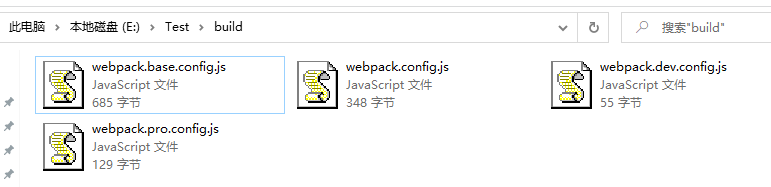
npm i -D webpack-merge
基本配置webpack.base.config.js
const path = require("path"); const HtmlWebpackPlugin = require("html-webpack-plugin"); module.exports = { entry: "./src/index.ts", output: { path: path.resolve(__dirname, "dist"), filename: "bundle.js", environment: { arrowFunction: false, // 关闭webpack的箭头函数,可选 }, }, resolve: { extensions: [".js", ".ts"], }, module: { rules: [ { test: /.ts$/, use: [ { loader: "ts-loader", }, ], exclude: /node_modules/, }, ], }, plugins: [ new HtmlWebpackPlugin({ template: "./src/index.html", }), ], };
开发环境配置webpack.dev.config.js
module.exports = { devtool: "inline-source-map", };
生产环境配置webpack.pro.config.js
const { CleanWebpackPlugin } = require("clean-webpack-plugin"); module.exports = { plugins: [new CleanWebpackPlugin()], };
配置主文件webpack.config.js
const { merge } = require("webpack-merge"); const baseConfig = require("./webpack.base.config"); const devConfig = require("./webpack.dev.config"); const proConfig = require("./webpack.pro.config"); module.exports = (env, argv) => { let config = argv.mode === "development" ? devConfig : proConfig; return merge(baseConfig, config); };
配置tsc
根目录下创建tsconfig.json,可以根据自己需要自行配置
{ "compilerOptions": { "target": "ES2015", "module": "ES2015", "strict": true } }
编写代码
根目录下创建src文件夹,src文件中创建index.html和index.ts index.ts
const box = document.querySelector('#app') const hello: string = 'Damumu' if (box !== null) { box.innerHTML = hello }
index.html
<!DOCTYPE html> <html lang="en"> <head> <meta charset="UTF-8"> <meta http-equiv="X-UA-Compatible" content="IE=edge"> <meta name="viewport" content="width=device-width, initial-scale=1.0"> <title>TS & webpack</title> </head> <body> <div id="app"></div> </body> </html>
配置命令
修改package.json添加如下配置
{ ...... "scripts": { "start": "webpack-dev-server --mode=development --config ./build/webpack.config.js", "build": "webpack --mode=production --config ./build/webpack.config.js" }, ...... }
最后,在命令行执行npm run build对代码进行编译,或者执行npm start来启动开发服务器